Finish your profile right here and directions for adding your Profile Picture (which appears when you post) is right here.
Chas Man
Members
-
Joined
-
Last visited
Everything posted by Chas Man
-
 Celebrate good times!
 -
“Zero chance I would be coaching anywhere else. I’m taken care of very well.” DL Press Conference There you have it!
-
IF we were not one of the best teams in the country, and IF we were not loading up with elite talent, and IF Bo Nix were not the front runner to win the Heisman, and IF we were not heading to the BIG, I MIGHT be slightly concerned with the A&M rumors. As it is, not so much. Go Ducks-the next one matters most!
-
Does Donte Moore hit the portal in search of a better future?
-
The sloppiness was a head scratcher. Definitely did not see that coming based on what we did the last couple of weeks. Can we just chalk most of it up to kicking off at almost 8 o’clock? Probably not. The silver lining is it’s hard to imagine this team with that performance going into Tempe with an over inflated sense of confidence! Go ducks, make it work for you!
-
Things that go THUD: Pile-drivers Sledgehammers DL’s Studs in Black Lids Go Ducks-play to your standard!
-
2 kicks + one shanked extra point + one kickoff out of bounds = what?
-
As you say, it could happen! I calm my anxious thoughts by reminding myself that DL is our head coach, and he seems to like winning even more than we do! Go Ducks-play to YOUR standard,
-
Works for me.
-
Charles, thank you for perfectly diagramming what a novice (me) noticed in that opening drive! I was giddy with excitement for the rest of the game because of what transpired in the opening sequence. It seemed like Utah was waiting/hoping we’d transition from the pass weighted play calling (balanced!) towards the “win in the trenches” approach. We never did! This coaching staff does indeed bring much more to the table than that. And with the playmakers they’ve assembled and a 5th year quarterback completing almost 80% of his passes in total command of the offense, why would you go “phone booth”? Thank you Mr Fishduck for bringing me back to that opening drive giddiness! Go Ducks!
-
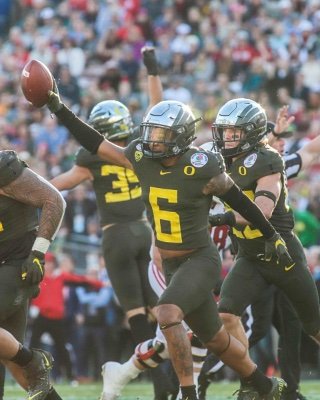
These are the “all business we are here to kick your…” uniforms. And if it snows the black helmets will provide a great visual focus for Nix’s check downs. Go Ducks!
-
Chip Kelly was an aggressive play caller at U of O. He was 4 and 0 against our hated rivals from the north. When does aggressive cross the line to wreck less?
-
Got to believe that crap has already reverberated through the locker room. “Us against the world” works for me. Who was that idiot celebrity they had on the set? If I ever see his ugly mug on a show, the show goes off. Going be nice to serve him a huge portion of humble pie. Go Ducks! Play to your standard.
-
Insanely long walks! Like maybe ten miles today. As an avid Duck fan living in Seattle, I’ve seen way too many husky dogs today (one is too many!) But alas, I remind myself there are way more ducks flying around and we have far better athletes and the game is decided one play at at time through four quarters. And I conclude, “Relax, we’ve got this!” Go Ducks!
-
This uni is ALL about the lid! Got some super hero stuff going on.That combo of wings (Brings to mind Apollos-whose role as the slayer of Python led to association with battle and victory) and the platinum (Brings to mind the Silver Surfer-who has the ability to project energy in various forms for offensive and defensive use) is a great look. Go Ducks-make ‘em hurt!
-
I’m enjoying OBD forum in Seoul Korea this morning. When I glanced at the games on tap for this weekend I noticed Georgia is on a 22 game win streak. My thought was, “You don’t play and win that consistently without playing to your own standard.” Then, lo and behold, Mr Fishduck draws attention to DL’s mantra of playing to our standard! Couldn’t agree more. Grateful for OBD forum!
-
Great article Charles. Couldn’t agree more. Just to pile on the evidence in favor of leaning towards the passing attack: Running backs were targeted 7 times vs Hawaii for 6 completions and 49 yards gained (7 yards per attempt). What logic would compel you to lean away from that kind of production?
-
There should be a YAS stat for the offensive line: Yards After Scrum. So satisfying to see our lineman downfield bullying the scrum forward for extra yards. Has to be demoralizing to the second level of the defense. On one play a couple of linemen pulled James the last 5 yards to the goal line. Athletic. Well coached. Bodes well for big games ahead. Go Ducks!
-
Offense looking like they came to play.
-
Jamal Hill looks like he’s ready to bring the hurt. I predict we’re going to see Dan Lanning’s vision for defense emerging more clearly this season. Go Ducks!
-
First Tulane, then San Jose State? Fight on!
-
Yeah, he said in his efforts to “work it out” he has had zero communication with Kliavkoff. Sounds like a hot mess, especially now that it appears Stanford is bolting for the ACC. Pass on a golden opportunity to join the Big for a chance to remain in that? Hmm, that doesn’t sound like good leadership.
-
Since we’re talking Beatles, I love the Oregon Band’s rendition of “Got to Get You Into My Life”. Rosé Bowls, Holidays, the Men Of Oregon rocking it on the field. Let the good times roll!
-
Conjures memories of Patrick Johnson and one of my favorite “away” games as a Duck fan. Getting ready for some football:
-
Great time to start a new 12 year run against the Mutts!